Decision recordedIn VeriProof
- Outcome
- Approved
- Decided in
- Slack
- Returned to
- Claims Payout Assistant
Slack integration
An agent waiting on someone to open a portal isn't doing the work you funded. VeriProof sends each review to its reviewer in Slack, where they can approve, reject, fill in the answer the application asked for, or send it a question. Every decision is recorded in VeriProof.
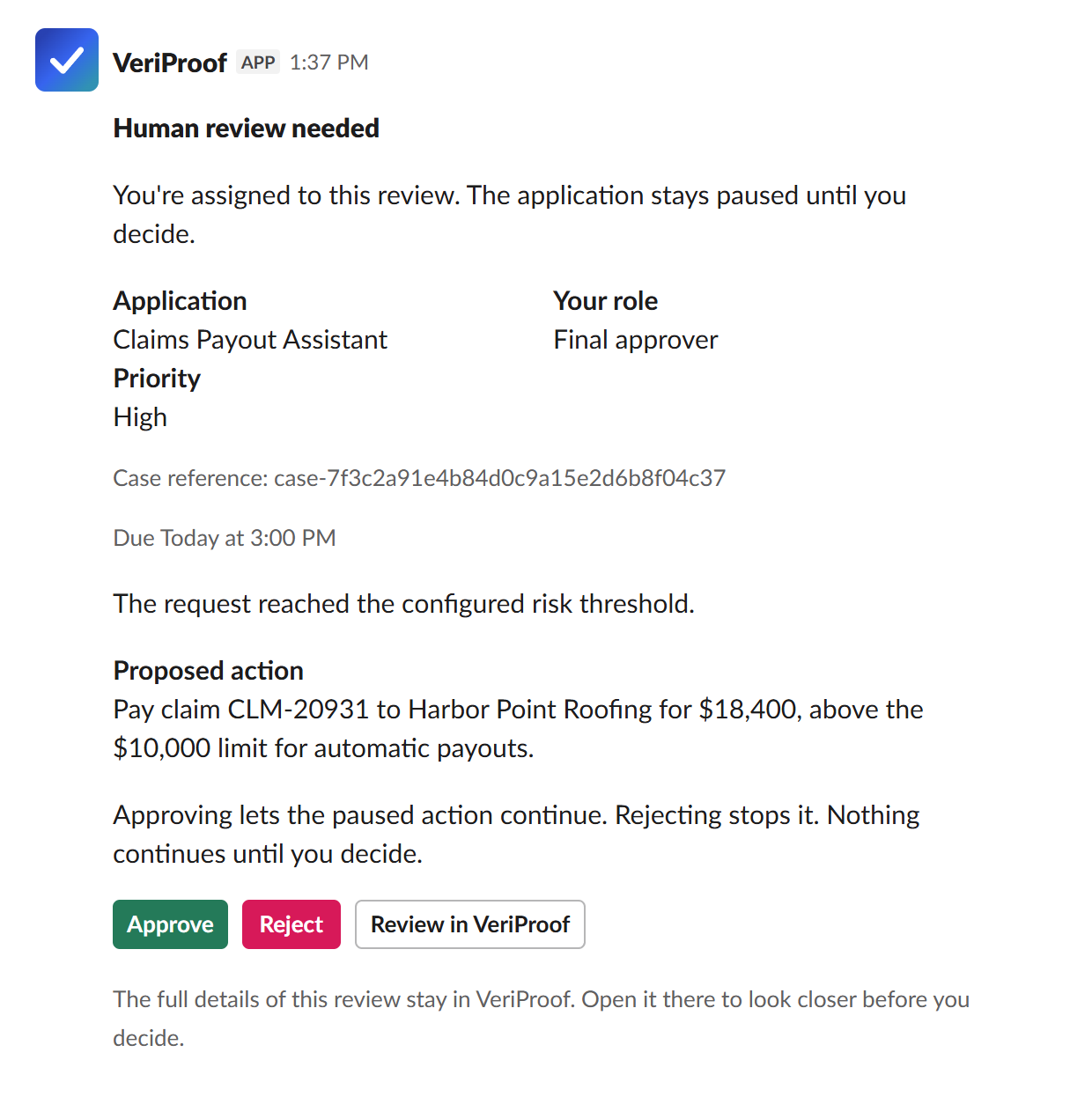
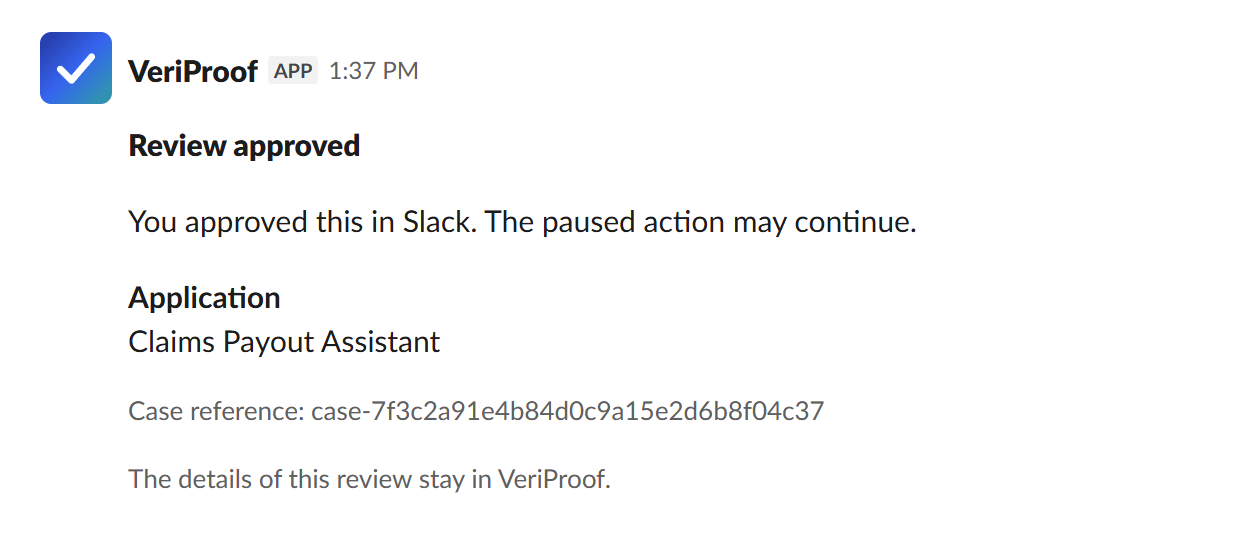
The message carries what the call needs: the application, the reviewer's role, the due time, why it needs review, what the agent proposes to do, and the details the application provided, up to your data limit. When the review is decided, answered, reassigned, canceled, or runs out of time, the same message changes to say so. Nobody acts on a request that's already settled.
1 · The reviewer gets a direct message
2 · They approve, and the same message updates
3 · VeriProof keeps the record
Decision recordedIn VeriProof
Slack forms collect what the application asked for and check it with the same rules as the review page. When a review needs something Slack can't hold, or details above your limit, the message takes the reviewer to the case in VeriProof.
| When the reviewer | What happens |
|---|---|
| Approves a routine review | It's recorded from the message. |
| Rejects a review | Slack asks for a reason, which is saved with the decision. |
| Approves a high-priority review | Slack asks them to confirm they've checked the details. |
| Answers what the application asked for | Respond opens a form with its fields: an amount, a choice, a date, or a short answer. A value outside the allowed range is pointed out before anything is recorded. |
| Has a question for the application | Ask the application sends it, and the review waits for the answer. |
| Needs a field above the data limit, or to change the action's data | The Review in VeriProof button opens the case there. |
Decisions made in Slack are recorded in VeriProof and returned to your application through the same process as portal decisions. Your administrator can turn decisions in Slack off, and messages then link to VeriProof for every decision.
The VeriProof app's Home tab in Slack lists the reviewer's open reviews, overdue and urgent first. Each one links straight to the review.
Some reviews belong to a team, not one person. An administrator can pick one private channel per application, and VeriProof checks that everyone in it is a full member of your organization. Each group review is posted there once. An eligible reviewer claims it from the post, the post shows who has it, and the review lands in their direct message to decide.
A review message shows the application, the reviewer's role and priority, a case reference, the due time, a one-line reason, and the proposed action. An administrator sets the most sensitive data Slack may show and collect: public only, or public and internal, which is the default. Details and fields above that limit never leave VeriProof. Prompts, model responses, tool data, and review notes stay there too.
Shared links are careful too. Paste a review link into Slack and the preview shows the application, status, reason, and due time only in a direct message or a private internal channel, and only when the person sharing it is working the review. Anywhere else, it says only that it's a VeriProof review.
Someone who manages integrations in VeriProof starts the install, and a Slack administrator approves it. Often that's the same person.
Use an account that can manage integrations for your organization.
The Slack page shows whether your workspace is connected and who has linked their account.
Slack lists what the app can do. Pick your workspace and select Allow. On Enterprise Grid, an org admin can add it for the whole organization.
Each reviewer opens the VeriProof app's Home tab in Slack once and confirms while signed in to VeriProof. After that, their reviews arrive as direct messages.
The setup guide walks through each step and every permission the app asks for. Our privacy policy explains what the Slack app keeps and when it's deleted. If you remove the app, VeriProof deletes the Slack account connections and workspace details it kept.
Each reviewer connects their Slack account to VeriProof once, by signing in to VeriProof. Decisions from their own review message are recorded under that connected account.
Yes. Decisions in Slack are on by default, and an administrator can turn them off. Reviewers still get their messages, and each one links to the review in VeriProof.
No. Everyone in a channel sees the same post, so the channel is where a review is claimed, not decided. The person who claims it decides from their own direct message.
Teams works the same way, with the same data limit setting. Teams cards also let the person who claims a group review decide on the channel post itself. See the Teams integration.
Tell us which decisions your agents hand to people. We'll show you how they reach reviewers in Slack and land in the record, and we reply within one business day.