Microsoft Teams integration
The review arrives in Teams. The answer goes back to the agent.
A paused agent is waiting on one person. VeriProof puts the review on that reviewer's own Teams card, where they can approve, reject, or give the answer the application asked for. Every decision is recorded in VeriProof and reaches your application the same way a portal decision does.
More than approve or reject
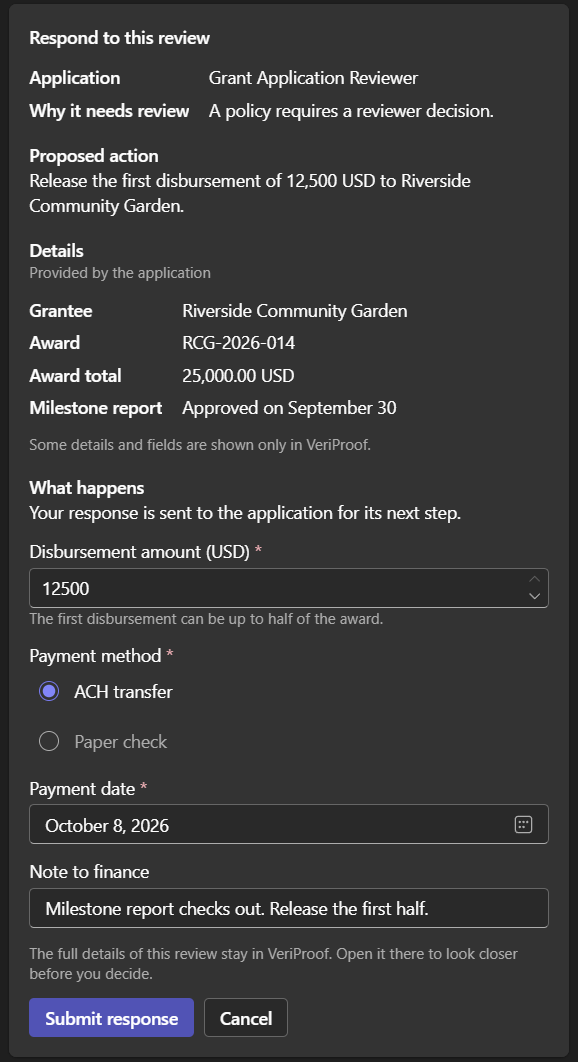
Many reviews need an answer, not a yes. The card asks for what the application defined, checks it the same way the portal does, and updates in place as the review moves.
On the card, a reviewer can:
- Approve, or reject with a reason that's saved with the decision. Approving a high-priority review asks them to confirm they've checked the details.
- Respond in the fields the application asked for: an amount within its limit, one or more choices from a list, a date in the allowed range, a short answer, or a note.
- Ask the application a question. The review stays open until it answers.
When a review needs something Teams can't collect faithfully, or a change to the action's own data, Review in VeriProof opens the case there. Your administrator can also turn decisions in Teams off. Cards then link to VeriProof for every decision.
You choose what Teams may see
An administrator sets the most sensitive data Teams may show and collect: public only, or public and internal, which is the default. Details and fields above that limit never leave VeriProof. If a review needs one of them, the reviewer answers in VeriProof. Prompts, model responses, tool data, and review notes stay there too.
Pasted review links follow the same care. A link shows the review's details only in a 1:1 chat or an approved team channel, and only when the person who shared it is working the review. Anywhere else it shows a plain "VeriProof review" preview, and guests get no preview at all.
Group reviews in one approved channel
Some reviews belong to a team, not one person. Instead of messaging everyone, VeriProof can post each of an application's group reviews once in a Teams channel.
An administrator picks the channel
One channel per application. VeriProof checks the channel's members in Teams and accepts it only if every member belongs to your Microsoft organization: no guests, no external members, and no shared channels.
They confirm what members will see
The application name, the reason for review, and the due time appear on each post. The administrator confirms everyone in the channel may see them.
A reviewer claims the post
Each person sees their own view. Eligible reviewers can claim the review, and the person who claims it gets the decision controls on the post. Everyone else sees who claimed it.
VeriProof keeps checking. If a guest joins or the channel otherwise stops qualifying, it stops posting there and sends those reviews to each group member's personal chat.
Every open review, one word away
A reviewer types reviews in their chat with the VeriProof app, or selects Show your reviews. The list puts overdue reviews first. Open shows a review's card right there, and Review in VeriProof opens the full case.
Questions from Teams administrators
Each reviewer connects their Microsoft account to VeriProof once. People who already sign in to VeriProof with that account are connected automatically. A decision is recorded under the connected VeriProof account, and VeriProof checks that person's authority for the review every time.
A Microsoft Entra administrator approves the VeriProof app for your organization from VeriProof's settings. Your Teams administrator then uploads the app package and makes it available to the people who review work.
Mostly. Slack reviewers decide from their own message: approve, reject, fill in a typed answer, or ask the application a question, within the same kind of data limit. A group review in a Slack channel is claimed from the post, and the claimer decides in their direct message, because Slack shows everyone in a channel the same post. See the Slack integration.
See a review reach Teams and come back
Tell us which decisions your agents hand to people. We'll walk through how they reach reviewers in Teams and land in the record, and we reply within one business day.