Remediation stays with its owner
Send a fix that needs doing to an existing ServiceNow issue or task, with a summary, priority, due date, and a link to the VeriProof record. Who owns it and where it stands stay in ServiceNow.
Each AI exception lands on the assigned reviewer's ServiceNow ticket with the questions it needs answered, and VeriProof records the answer next to what the application did.
A human-in-the-loop review often needs more than approve or reject. A purchase exception may need an approved amount, a payment date, and a reason. A customer decision may need a choice from an agreed list. The reviewer opens a form from the assigned ticket and answers there.
Forms accept single or multiple choices, numbers, amounts, percentages, dates, and written responses, with the required fields and limits the application set. Reviewers can ask the application a question while the action stays paused. A review that needs protected content, or a field ServiceNow can't collect, opens in VeriProof instead.
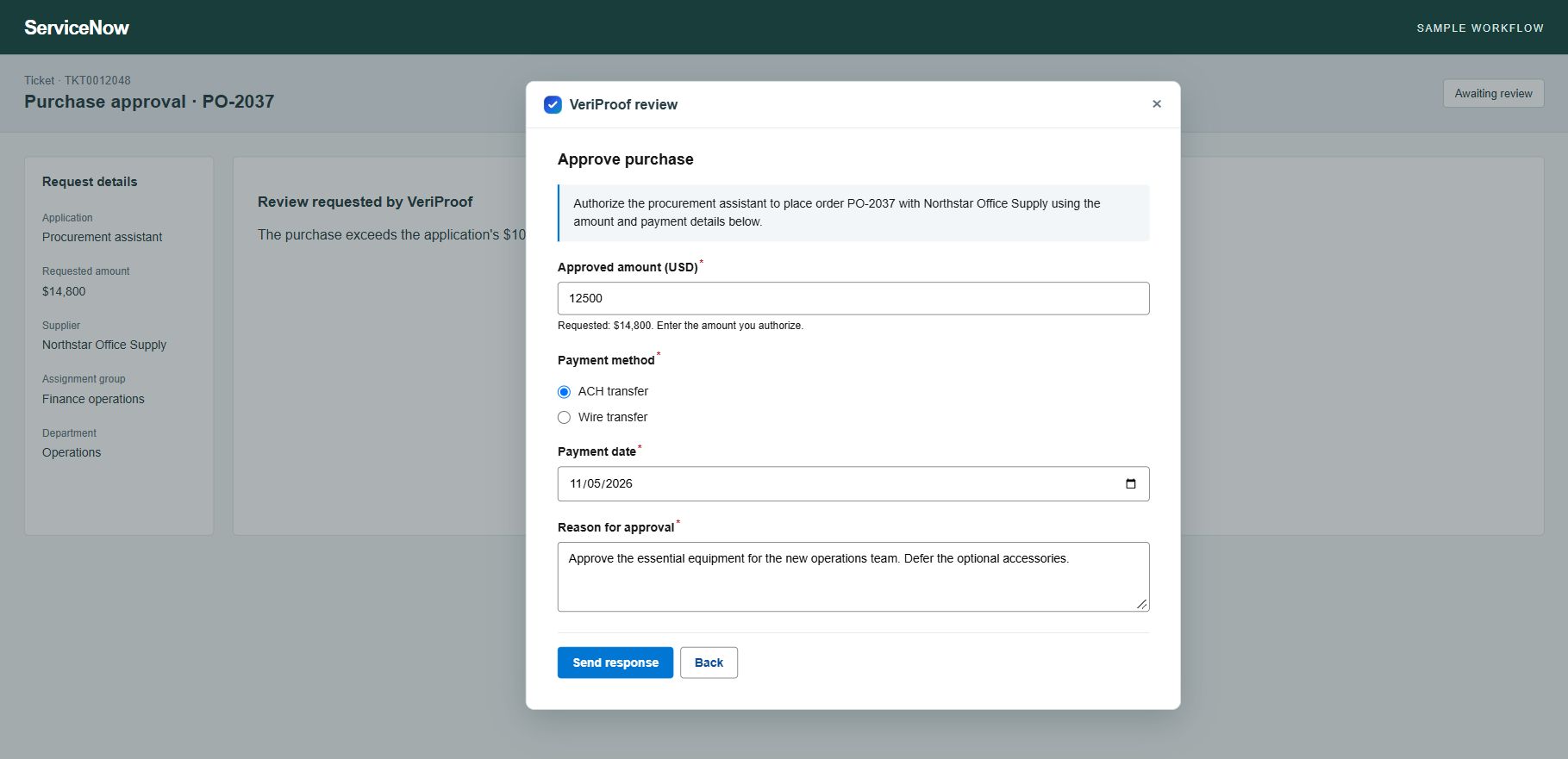
Your application checks the action against your business rules. An exception pauses the action and opens a review on the reviewer's ticket.
They open Review request, check the proposed action, and approve, reject, fill in the requested answers, or ask a question.
Before recording the answer, VeriProof checks the reviewer's linked account, current authority, and assignment.
The application continues or stops under the decision, then reports what happened. The record keeps the reviewer's decision and the application's result side by side.
Choose which reports ServiceNow receives: governance summaries, reports on policy checks and human reviews, assessments, and framework evidence for Agentic Trust Controls, the EU AI Act, ISO/IEC 42001, NIST AI RMF, SOC 2, and HIPAA. Preview each PDF, then send it to the evidence request your team already uses for that control.
VeriProof checks the delivered file against the original report and keeps a delivery record. Your ServiceNow process decides whether evidence is accepted and whether controls are met.
Send a fix that needs doing to an existing ServiceNow issue or task, with a summary, priority, due date, and a link to the VeriProof record. Who owns it and where it stands stay in ServiceNow.
Link review tickets and evidence to the application's existing record in your ServiceNow configuration database, so teams find its AI governance work in a familiar place.
VeriProof sends each application's count of overdue reviews to ServiceNow, which flags the related control when the count passes the limit you set.
AI Control Tower tracks your AI inventory. VeriProof adds the record behind each action: the rule that applied, the person who decided, and what the application reported.
VeriProof's team sets up the connection with your ServiceNow administrator in a working session.
It registers your ServiceNow site and the features you want: reviews, evidence, fixes, or overdue-review tracking.
They install the VeriProof app in ServiceNow, set its access rules, create a sign-in for VeriProof, and link each reviewer to their VeriProof account.
In Settings → ServiceNow, they enter the sign-in details. VeriProof checks what your ServiceNow site supports before saving.
VeriProof signs in with the credentials your admin creates. They reach only the VeriProof app in ServiceNow and the files VeriProof delivered, and nothing else in your ServiceNow data. VeriProof stores them encrypted, and disconnecting deletes them.
Reviewer answers come back signed. VeriProof accepts an answer only when the reviewer submitted it personally, never when someone else acted as them, and checks their account, authority, and assignment before recording it.
Partners can design a client's rules and reviews, connect them to the client's ServiceNow work, and run review and evidence preparation as an ongoing service.
| Permission | Access | Purpose |
|---|---|---|
| An OAuth sign-in limited to the VeriProof app in ServiceNow | Read and write | Open reviews on tickets, deliver evidence, and update remediation records |
| Files VeriProof delivered | Read | Confirm each delivered file matches the original report |
Bring the application and the ServiceNow process you want to connect, and we'll help you shape the review and the evidence behind it.